New in 2.1 · The 14-Day Static Plan


Most freedivers train blind.Stop guessing. Start knowing.

Your personal Static Apnea coach. Every hold measured, every contraction marked, every session a little deeper.

Free to start · No ads · iPhone & Android
The problem

A stopwatch tells you how long. Never why you stopped.

You hold your breath, you watch a number climb, you tap stop. But the number hides everything that matters — when the first contraction came, how long you fought it, whether today was readiness or recklessness.

Train like that and you're guessing. Some days you push too hard. Most days you leave time on the table and never know it.

The shift

STAmaster makes the invisible measurable.

Three things separate a guess from a session that teaches you something. STAmaster captures all of them, on every hold.

01

Contractions

Mark the exact moment your diaphragm starts to fight. The single most honest signal in apnea.

02

CO₂ tolerance

How early that first contraction arrives — and how you train it down, week over week.

03

Struggle endurance

How long you hold after the contractions begin. Where real breath-hold time is won.

New · 14-Day Static Plan

Your road to 4+ minutes.

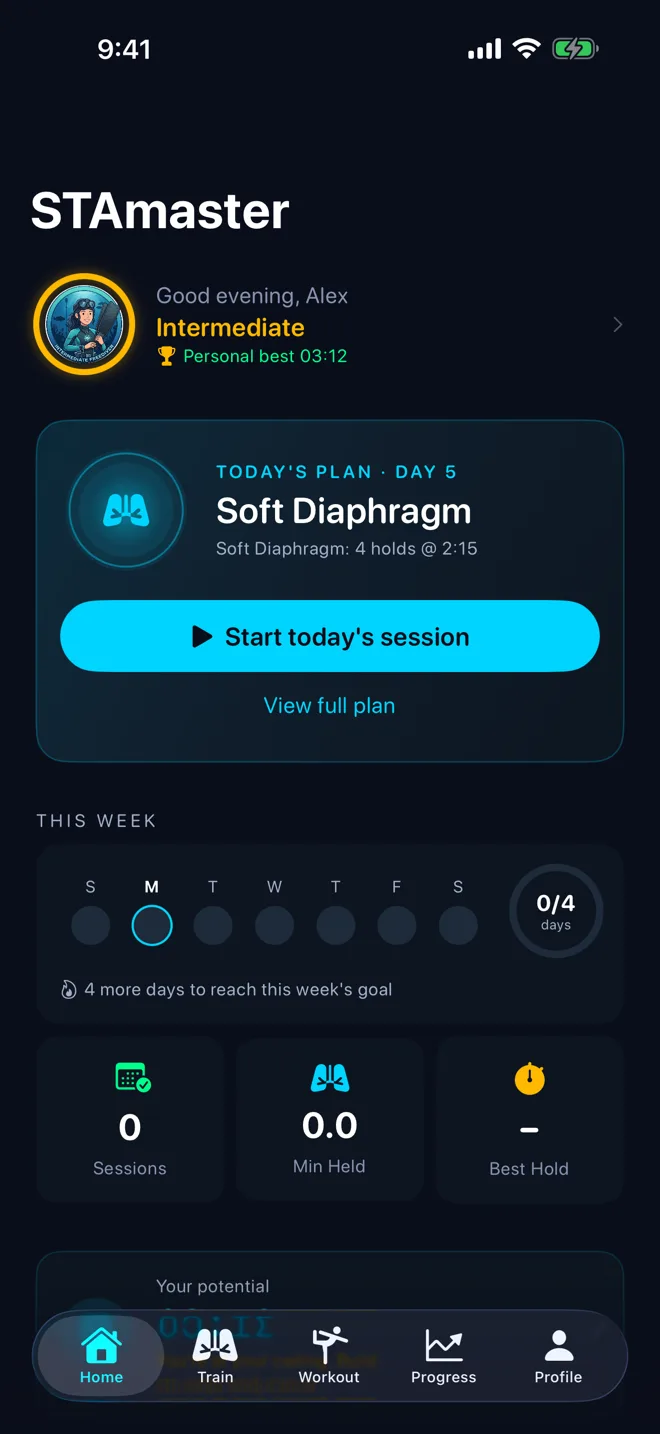
A guided program for divers who already hold three minutes. Each day pairs a ten-minute prep with breath-holds scaled to your own personal best.

  • Scaled to you. Free holds, CO₂ tables and an O₂ climb, all set from your PB — not a generic chart.
  • Prep, then holds. Relaxation, rib-cage and diaphragm stretching, progressive exhale holds and meditation get you ready before every session.
  • Built to peak. Relax and delay contractions in week one, extend and rehearse in week two, rest, then test for 4:00+.

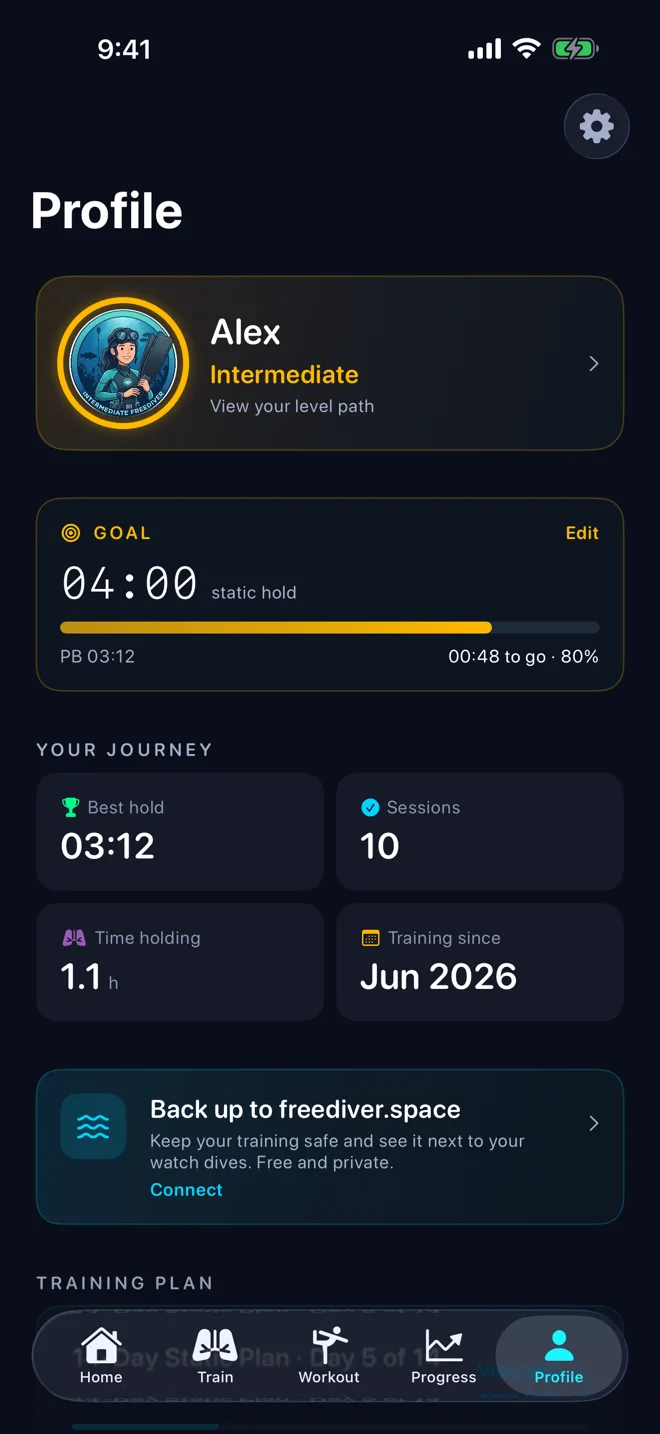
Unlocks once your best hold reaches 3:00. Find it in Profile › Training plan.

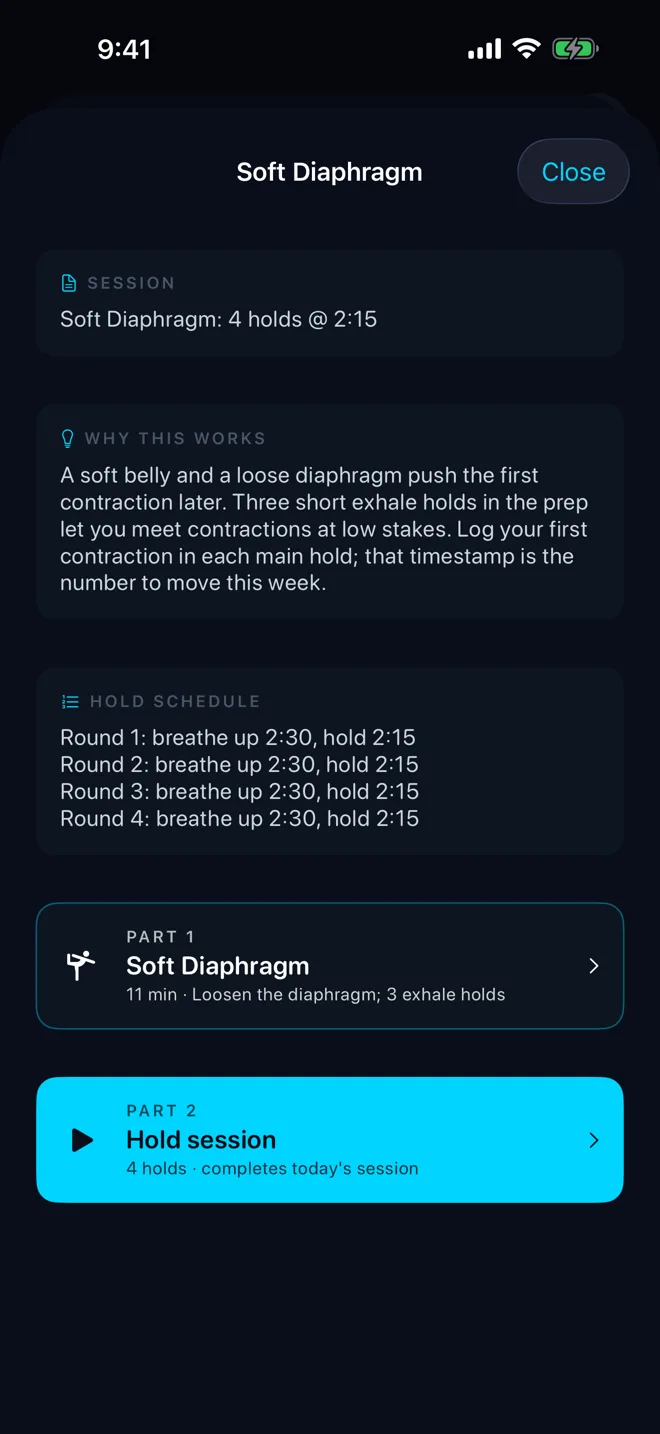
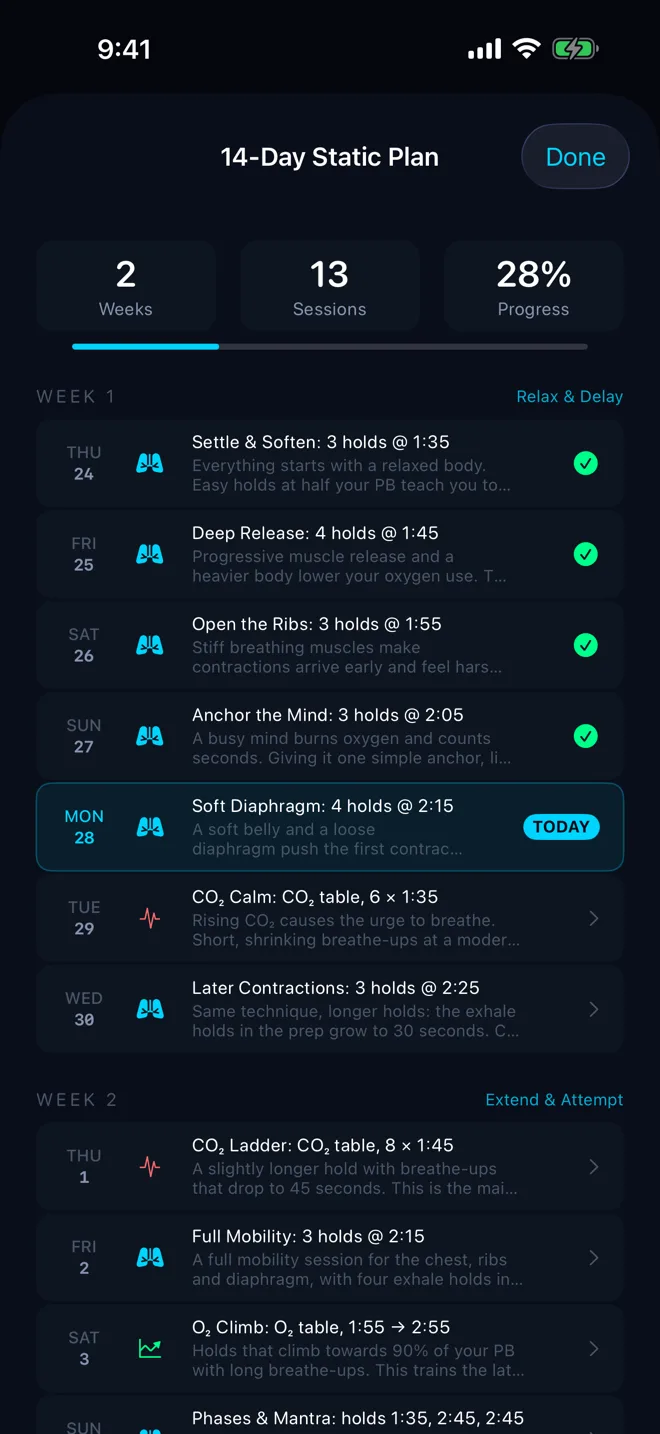
14-Day Static Plan with days one to four completed and day five marked today
Plan day: why it works, the hold schedule, and the prep and hold parts

Week 1 · Relax & Delay

  1. 1Settle & Soften
  2. 2Deep Release
  3. 3Open the Ribs
  4. 4Anchor the Mind
  5. 5Soft Diaphragm
  6. 6CO₂ Calm
  7. 7Later Contractions

Week 2 · Extend & Attempt

  1. 8CO₂ Ladder
  2. 9Full Mobility
  3. 10O₂ Climb
  4. 11Phases & Mantra
  5. 12Dress Rehearsal
  6. 13Recharge
  7. 14Test Day

Precision timer

Time the hold. Mark the moment.

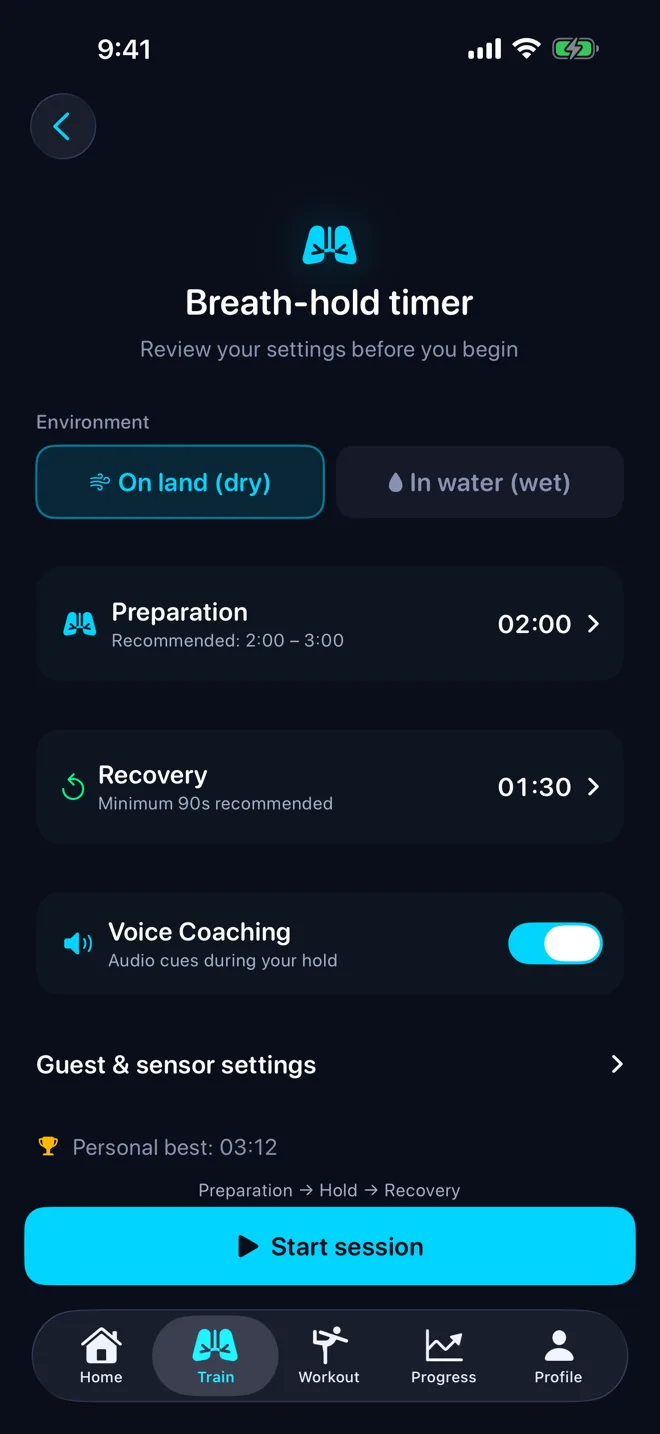
A millisecond-accurate timer with real-time contraction marking and voice coaching cues. It keeps running in the background, so your screen can stay dark and your mind can stay still. Dry or wet, free hold or table — set it up the way you train.

STAmaster breath-hold timer setup: environment, preparation, recovery and voice coaching
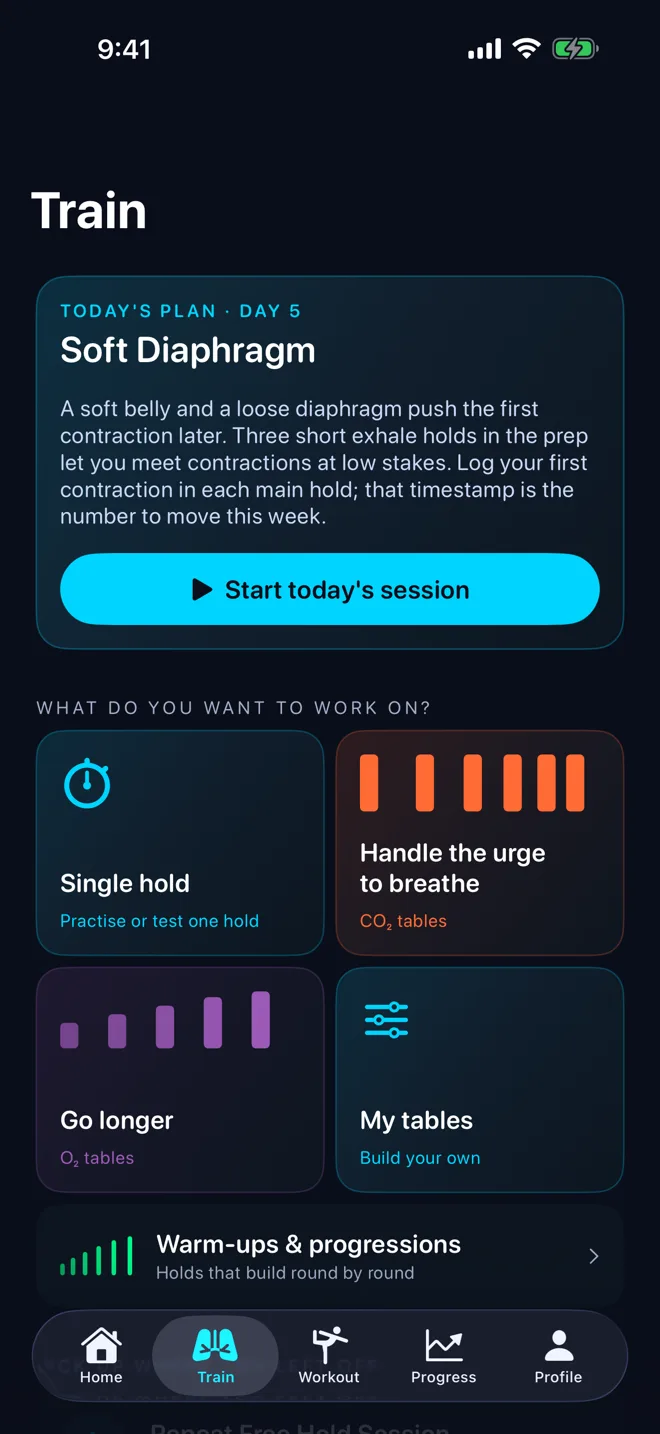
STAmaster Train tab with today's plan and CO2, O2 and custom table goals

CO₂ & O₂ tables

The method, not just the timer.

A full library of training tables — CO₂ tolerance with fixed holds and shrinking rest, O₂ extension with progressive holds. Pick from a curated set by level, or build your own with custom holds and breathe-up. The structure that turns practice into progress.

AI coaching & progress

A coach that reads your data.

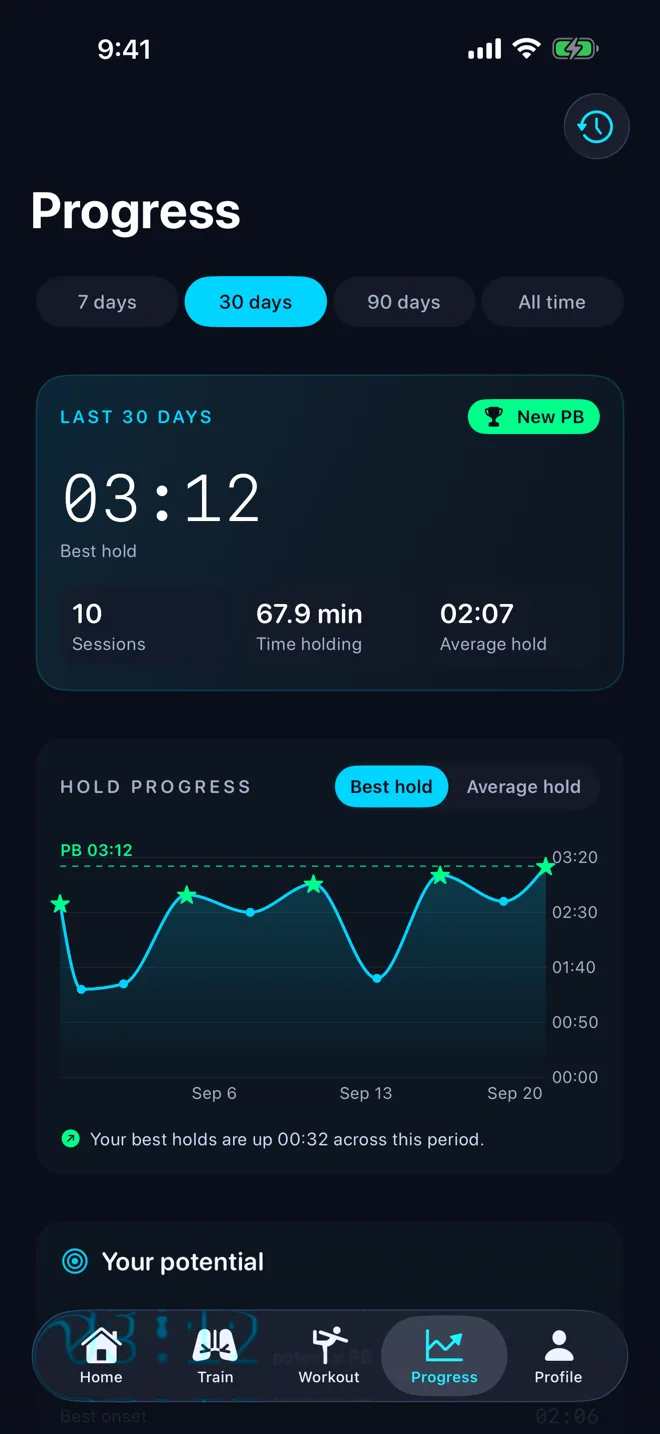
Personalised training plans that adapt to your level. Post-session analysis with one actionable tip, plateau detection when your numbers stall, and unlimited history with heart-rate charts and trends. Train enough and the “Your potential” card projects a realistic ceiling from your own best CO₂ tolerance and struggle endurance.

STAmaster Progress: a new 3:12 personal best and the best-hold trend over 30 days

The deep dive

Watch your oxygen, live.

Connect a Lepu PC-60FW pulse oximeter and STAmaster streams SpO₂, heart rate, and perfusion index straight from your fingertip — with a hypoxia alert you set yourself.

  • Live SpO₂ & perfusion through every hold, with a per-hold oxygen trajectory in the summary.
  • Real-time heart rate from Bluetooth straps (Polar, Garmin, Wahoo) or the oximeter — pick your source per session.
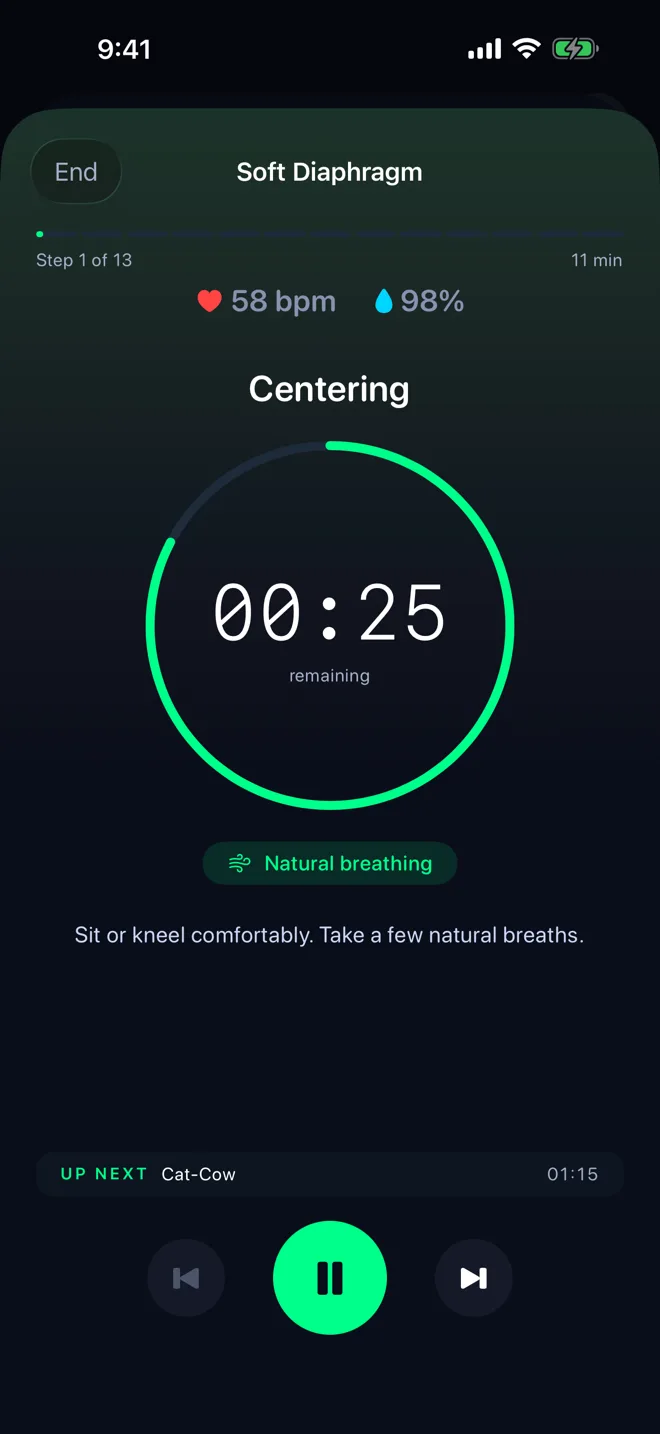
  • Guided workouts too. Breathwork, yoga and plan prep show live heart rate and SpO₂ whenever a sensor is connected.
  • A hypoxia floor you control — default 80%, adjustable 70–90%.
Guided prep workout showing live heart rate 58 bpm and SpO2 98%

The ethos

Train hard. Never train alone in water.

The first rule of freediving isn't optional, so neither is ours. STAmaster requires a buddy check before any wet static session. The app is a training aid — your safety buddy is what keeps you safe.

How-to

Bring your own sensors.

Two of the most common setups, step by step.

Connect your Amazfit watch

Broadcast your Amazfit heart rate straight to STAmaster over Bluetooth — no extra apps in between.

  1. Open Heart Rate Push on the watchOn your Amazfit, open the Heart Rate Push app and start broadcasting.
  2. Open a timer or table in STAmasterOn the setup screen, tap the heart rate row to search for devices.
  3. Pick your watchTap your Amazfit (e.g. T-Rex 3 Pro) when it appears. STAmaster remembers it and reconnects next time.
  4. Start trainingYour heart rate streams live through every hold and is saved with the session.
STAmaster breath-hold timer setup, with Guest & sensor settings where you connect the oximeter

Connect a Lepu PC-60FW pulse oximeter

Stream SpO₂, heart rate, and perfusion index directly from your fingertip.

  1. Power on the oximeter and insert your fingerWait for a steady SpO₂ reading on its screen and keep it close to your iPhone.
  2. Tap Connect in STAmasterOn the STA timer, table, or protocol setup screen, open Guest & sensor settings and tap Connect on the SpO₂ Alert card. You can also go to Profile › All settings › Pulse Oximeter › Pair Oximeter.
  3. Pick your PC-60FWSTAmaster scans automatically. Tap your oximeter when it appears (or Scan Again if it doesn't). The sheet closes once connected, and STAmaster reconnects to it automatically next time.
  4. Set your hypoxia floor (optional)On the same SpO₂ Alert card, keep the alert on and adjust the Floor. Default is 80%; range is 70–90%. It's also in Profile › All settings › Pulse Oximeter.
  5. Start a sessionSpO₂, heart rate, and perfusion index stream live during every hold. The session summary shows a per-hold SpO₂ trajectory.

The price

Train free. Go further with Pro.

The timer, the built-in tables, live heart rate and SpO₂, safety, history and backup are free, with no ads. STAmaster Pro adds the deeper tools: $2.99 a month, or $19.99 a year with a 7-day free trial. Prices may vary by country.

Free

  • Precision STA timer with voice coaching
  • 10 built-in CO₂ & O₂ tables
  • Live heart rate & SpO₂ with hypoxia alerts
  • Guided breathwork, yoga & meditation
  • 14-Day Static Plan, days 1–3, and a starter protocol
  • Unlimited session history, PBs & streaks
  • 7- and 30-day progress
  • freediver.space backup, restore & export
  • Safety buddy-check system

STAmaster Pro (iPhone)

  • Every breath protocol, the protocol editor & library publishing
  • Custom table builder & progressions
  • The full 14-Day Static Plan & personalised 28-day plans
  • 90-day & all-time progress, CO₂ tolerance trends, potential & coach insights
  • Heart rate charts, SpO₂ detail & dive-reflex analysis

Subscriptions renew automatically unless cancelled at least 24 hours before the end of the current period. Manage or cancel any time in your Apple ID settings.

Support

Having trouble or have a question? We're here to help.

Contact

Email us at support@code3.io

Is STAmaster free?

Yes, the core of STAmaster is free with no ads: the timer, the built-in CO₂ & O₂ tables, live heart rate and SpO₂, safety checks, history and freediver.space backup. STAmaster Pro is an optional subscription in the iPhone app ($2.99 a month, or $19.99 a year with a 7-day free trial; prices may vary by country) that adds custom tables, every breath protocol, full training plans, deeper progress and sensor insights. Cancel any time in your Apple ID settings.

What is the 14-Day Static Plan?

A 14-day guided program — your road from a comfortable 3:00 to a 4:00+ static hold. Each day combines a short guided prep with breath-holds scaled to your PB. It unlocks once your best hold reaches 3:00 — start it from Profile › Training plan.

Do I need a heart rate monitor?

No. Bluetooth heart rate monitors and pulse oximeters are optional. The core timer, tables, and coaching features work on iPhone alone.

Is my data backed up?

Your training is stored on your device and included in your iPhone backup (iCloud or Finder). You can also connect a free freediver.space account in Profile to back up your sessions online.

Can I use it for dry static training?

Yes. Dry static (on land) does not require a buddy check. The buddy-check safety prompt only appears for wet static sessions.

Which pulse oximeters are supported?

The Lepu PC-60FW is fully verified end-to-end. Other Lepu models that speak the same protocol (PC-66B, Oxysmart, Wear O2) may work but are not guaranteed. If you have one of these, try pairing it via Profile › All settings › Pulse Oximeter › Pair Oximeter and email us if it doesn't connect.

How do I switch heart rate source?

Open any STA Free Hold or Table setup screen and tap the heart rate row to choose a source: Auto, Pulse Oximeter or BLE Strap. Auto prefers the oximeter when connected, then a strap. Your choice persists across sessions.

Why does my SpO2 reading lag behind reality?

Fingertip pulse oximeters typically read about 10 seconds behind your true arterial saturation, and the lag gets longer during a breath-hold — the dive response shunts blood away from your fingers to protect your core. This is physics, not a bug. STAmaster captures samples for 30 seconds after the hold ends so the real oxygen nadir gets recorded properly.

When does the "Your potential" card appear on Progress?

After you've completed 10 distinct training sessions where you marked at least one contraction. The card combines your best CO2 tolerance (latest first-contraction time) with your best struggle endurance (longest time after first contraction) to project a realistic ceiling.

What iOS version do I need?

STAmaster requires iOS 17 or later.

Is there an Android version?

Yes! STAmaster is now available on Android. Get it on Google Play — a native build with full feature parity.